RBAC Access Control#
The piveau access control provides extensive capabilities for controlling access to metadata. It ensures that permissions are consistently enforced across piveau backend services.
Table of Contents#
Introduction#
The piveau access control allows detailed control of read and write access to metadata such as catalogues, datasets, and resources for users and services.
Currently, Keycloak is used as an Identity and Access Management (IAM) system, managing user and service accounts and assigning their permissions. The management of permissions applies specifically to the piveau backend services.
If the authorization data generated by Keycloak is intended to be used for authorization in other services, Keycloak must be extended to include the required information.
Architecture#
The following list depicts some examples of how Keycloak can be used in piveau:
-
Keycloak is used for authentication and authorization.
In this scenario, the user logs in via the Keycloak login page. The frontend communicates directly with Keycloak. -
Keycloak is used for authorization, and an external provider is used for authentication.
In this scenario, the user logs in using an external authentication service. The identity from the external provider is mapped to a Keycloak identity. Redirection and mapping are handled by Keycloak. The frontend communicates directly with Keycloak. -
Keycloak is used for authorization, and an external provider is used for authentication.
In this scenario, a middleware manages identities and performs the mapping between the external provider and Keycloak. The frontend communicates with the authentication middleware.
Scenario 1 is the most commonly used in piveau.
In all three scenarios, the frontend or client uses the Keycloak token to call backend APIs.
Features#
Open and closed data#
Using the piveau access control, it is possible to manage both open and closed data. View access to datasets and resources can be restricted so that anonymous users — or more generally, users without the corresponding permissions — cannot access them.
This changed paradigm, compared to the previous access control approach, leads to the following implications:
- The triple store contains both open and closed metadata. Therefore, it cannot be publicly accessible at the moment. Other mechanisms must be applied to provide a public SPARQL endpoint.
- Draft datasets and resources are not stored in the secondary triple store but, like published datasets, in the primary triple store. As a result, they are accessed via the regular dataset API, and the draft API is disabled when using piveau access control v2.
- Draft datasets and resources are now indexed in hub-search, making the hub-repo draft API unnecessary for retrieving draft datasets from the backend.
- Read access must be enforced across all relevant backend services, including hub-repo, hub-search, and later hub-store.
Service access#
External services can access backend services like hub-repo using either API keys or Keycloak service accounts.
API keys are configured in the backend service configuration. If an external component or service wants to use a service account to access the piveau backends, a specific client is created in Keycloak. The corresponding service account is treated like a normal user account in terms of permission assignment.
Please note that the granularity of these two access methods differs:
- The API key mechanism allows the configuration of keys that grant access to all or specific catalogues. Within the context of the specified catalogues, the client is allowed to perform all relevant operations.
- When using service accounts, a more fine-grained permission assignment is possible (like for regular users). For example, a client may be allowed to update a dataset but not delete it. This level of control is not achievable with API keys.
Context based roles#
We consider the metadata to be organized in a hierarchical structure, consisting of optional super catalogues, catalogues, datasets, and resources.
Currently, there is no first-class representation of organizations in the backend, so super catalogues can be interpreted as organizations that contain several catalogues.
Regardless of the structure and its interpretation, these levels are represented in Keycloak to allow permission assignment at different levels. Assigned permissions are inherited along the hierarchy. If a user has permissions assigned at the super catalogue level, these permissions apply to all contained sub-catalogues and all contained datasets/resources.
Permissions assigned to a specific catalogue are valid only within the context of that catalogue and its contained elements. It is also possible to assign permissions at the level of individual datasets or resources.
Permissions are not inherited along other relationships between entities (e.g., resources referencing datasets or other resources).
In addition to the described levels, access control allows the assignment of permissions that apply to the entire piveau system. For example, a user may have permission to create datasets in all catalogues.
To summarize: permissions can be assigned at the level of super catalogue, catalogue, dataset/resource, and system-wide/global level. Permissions are inherited along the hierarchical structure and currently cannot be revoked at a lower level. For instance, it is not possible to express rules like: permission to edit datasets in catalogue X except for dataset Y.
Atomic permissions and project specific roles#
The term atomic permissions refers to individual operations that can currently be controlled in the backend (e.g., create dataset, update dataset, publish dataset). These permissions are defined from a technical backend perspective.
In contrast, roles assigned to users can be defined in a project-specific context. Such roles represent a mapping to a set of atomic permissions.
Example: A specific project may differentiate between a data editor and a data publisher. Therefore, two distinct roles are defined and mapped to different atomic permissions. Another project may not distinguish between data editor and a data publisher and defines a single role that includes both editing and publishing permissions.
To summarize: the backend provides a set of atomic permissions, and these permissions can be used to construct project-specific roles.
Flexible structures in Keycloak#
In order to assign roles to users at different levels, the relevant parts of the hierarchical structure are represented in Keycloak. Roles are defined in the context of each element. This is implemented as a hierarchical group structure in Keycloak.
Each group representing a piveau entity contains a set of roles. The global/system-wide context is represented as an explicit group, allowing global roles to be assigned in the same way as roles at the catalogue or dataset level.
Administrators are free to create additional custom roles. For example, a role can be defined that grants permission to create datasets in catalogue X, publish datasets in super catalogue Y, and view restricted datasets across the entire portal.
Publication status and access level of datasets / resources#
In order to enable extended scenarios in the context of the piveau access control, the following properties of datasets and resources have been introduced.
- Publication status: property that indicates, whether the entity is in a published or draft state (published/draft)
- Access level: property that provides information about the access level of an entity (public/restricted/internal)
The setting of these properties is controlled by atomic permissions and the values of these properties are used to decide, whether an operation can be performed or not. In case of "listing" operations in hub-repo and hub-search, the result set depends on user permissions and on the specific values of the additional properties of datasets and resources.
Restricted output of datasets#
There might be use cases where only a part of a dataset is allowed to be viewed by the user depending on the dataset's access level and user's permissions. The approach allows hiding URLs when viewing a dataset without the full permissions.
In hub-repo the specific URLs are replaced by the dataset piveau URI in order to ensure compatibility with DCAT-AP. Hub-search returns the data without the access and/or download URLs. Whether a user can view the access URLs depends on the viewing permissions and the access level of the corresponding entity.
Technical details#
Implementation in Keycloak#
To enable role assignment for users in different contexts, the following concepts are applied:
- Keycloak groups represent the relevant part of the backend data structure. Subgroups define the configured roles within the context of specific entities. A role can be assigned to a user by adding them to the corresponding subgroup.
- Each relevant backend entity is represented as a Keycloak resource, which includes the possible atomic operations (referred to as Keycloak scopes). A UMA policy, maintained by hub-repo, links the corresponding subgroup (representing a role) with the resource and selected atomic operations. This structure supports the configuration of project-specific roles and the creation of custom roles. Custom roles are not managed by hub-repo, but rather by an administrator in Keycloak.
- The resulting authorization data specifies the permitted atomic operations on specific resources.
- If the authorization data is intended to control access beyond hub-repo and hub-search, additional data must be configured in Keycloak (e.g., other groups, user attributes, etc.).
Used token#
In the previous access control approach, the Requesting Party Token (RPT) was used to call backend endpoints. This token contains the complete permission structure. If the token includes a large amount of authorization data, its size may exceed the limits accepted in the Authorization header.
To overcome this limitation, it is recommended to use the User Access Token (UAT). The permissions associated with the token can be retrieved using the following Keycloak request:
curl --location '<KeycloakURL>/realms/piveau/protocol/openid-connect/token' --header 'Content-Type: application/x-www-form-urlencoded' --header 'Authorization: ••••••' --data-urlencode 'grant_type=urn:ietf:params:oauth:grant-type:uma-ticket' --data-urlencode 'audience=piveau-hub-repo' --data-urlencode 'response_mode=permissions'
Relevant properties of datasets and resources#
Publication Status#
The property publication status indicates whether a dataset is published or in draft mode. This property applies to both datasets and resources. A draft dataset is intended for editing by users with specific permissions. Drafts cannot be viewed by users who are only allowed to access the published version of a dataset.
A dataset can be published or unpublished by changing its publication status, effectively marking it as either "published" or "draft".
Any operation on a dataset that modifies published data is considered publishing or unpublishing and therefore requires the corresponding permission. For example:
- If a draft is created, updated, or deleted, the user only needs the corresponding update permission.
- If a published dataset is created, updated, deleted, or its publication status is changed, the user also needs the publishing/unpublishing permission.
Update and publish permissions can be combined in a single role (allowing the same user to edit and publish datasets) or separated into distinct roles. Using separate roles enables more fine-grained user workflows.
Access Level#
This property defines the visibility of a dataset. The following values can be used:
publicrestrictedinternal
In the frontend, these values can be displayed using different labels as needed. The impact of this property on decision logic will be described in a later section.
Atomic permissions#
The atomic permissions are defined in the context of the piveau backend and represent the atomic operations that can be controlled in hub-search and hub-repo. Currently, the following atomic permissions are defined:
-
Context: piveau system, catalogue, dataset
dataset:view_draft- user can view dataset/resource with the publication status "draft"dataset:view_published- user can view dataset/resource with the publication status "published"dataset:update- user can update a dataset/resourcedataset:delete- user can delete a dataset/resourcedataset:publish- user can publish a dataset/resource (publication status is changed)
-
Context: piveau system, catalogue
dataset:create- user can create a dataset/resourcecatalog:view- user can view the catalogue metadata (please note: currently all users can view all catalogue meta-data. The access level at catalogue level is future work)catalog:update- user can update a cataloguecatalog:delete- user can delete a cataloguecatalog:create- user can create a catalogue
Atomic permissions can be used to construct project-specific roles. If a project-specific role requires more fine-grained operations, new atomic permissions must be introduced. Below are some examples of extended new atomic permissions:
- Differentiate between controlling the creation of datasets and the creation of specific resources.
- Explicitly control the ability to move a dataset between different catalogues.
- Control the ability to read only the dataset description.
Decision logic#
The decision logic not only determines whether a backend operation is allowed or not; it can also influence the outcome of several operations, such as listing operations in hub-repo or search operations in hub-search.
User permissions#
The following section describes the rules for handling atomic permissions:
- Anonymous user
- can view public, published datasets
- Logged in user
- no explicit permissions - user can view public, published datasets and also published, restricted datasets without the access URLs and download URLs
dataset:view_published- user can view all published datasets (in the context of the permissions) independent of the access level (This also includes the internal datasets)dataset:view_draft- user can view all drafts independent of the access level (in the context of the permissions)dataset:publish- user can change the publication status of datasets. In combination with dataset:update user can update published datasetsdataset create- user can create a draft dataset. In combination withdataset:publish, user can create published datasets (independent of the access level)dataset:update- user can update a draft dataset. In combination withdataset:publish, user can update published datasets (independent of the access level)dataset:delete- user can delete a draft dataset. In combination withdataset:publish, user can delete published datasets (independent of the access level)catalog:create- user can create a cataloguecatalog:update- user can update a cataloguecatalog:delete- user can delete a cataloguecatalog:view- currently, all users can view catalogue metadata. This atomic permission is intended for future use to control catalogue visibility.
Note
There is currently no difference between controlling the listing and viewing of datasets.
If a user has the view permission on a dataset, the dataset is both listed and can be viewed.
If there is no view permission (implicit or explicit), the dataset is neither listed nor viewable.
API Keys#
API keys are used to access the hub-repo. The configuration can include zero or more API keys (0..*).
- Each API key can be assigned to one or more specific catalogues or to all catalogues (denoted by "*").
- API keys can be associated with catalogues and/or super catalogues.
- If an API key is assigned to a super catalogue, it automatically applies to all sub-catalogues within that hierarchy.
Super catalogue -> catalogue relationship#
In piveau, the concept of super catalogues is supported. A super catalogue can contain multiple sub catalogues, and a sub catalogue may reference a super catalogue. This relationship is defined in the RDF data by the client that calls the catalogue API of hub-repo. Because the security model depends on this hierarchical structure, clients cannot arbitrarily change the super catalogue–catalogue relationship. Doing so would significantly alter assigned permissions. Such operations are planned for the future and will be controlled by dedicated permissions. Currently, hub-repo enforces the following rules when creating or updating catalogues:
- Create catalogue:
- You can create a catalogue with or without an
isPartOfrelationship if you have the catalogue:create permission in the specific context. - If the catalogue referenced by the
isPartOfproperty does not exist, the operation is not allowed. - If the catalogue referenced by the
isPartOfproperty exists, the operation is allowed.
- You can create a catalogue with or without an
- Update catalogue:
- If the payload contains a modified reference to the super catalogue, the operation is not allowed. That means, moving a catalogue to a different super catalogue is currently not permitted.
- In the future, this will be supported through specific permissions in both the source and target contexts.
Representation of entities in Keycloak#
To enable assignment of roles and contexts, the relevant backend entities must be represented in Keycloak. These primarily include catalogues and super catalogues. If permissions need to be assigned at the level of datasets and resources, these entities must also be represented in Keycloak.
In summary:
- In some cases, datasets and resources must be represented in Keycloak to allow permission assignment at this level.
- For other projects, this may not be necessary.
Therefore, the creation of datasets and resources in Keycloak can be controlled via hub-repo using configurable strategies:
Available Strategies#
| Strategy | Description |
|---|---|
always |
Datasets and resources are always created in Keycloak. |
never |
Datasets and resources are never created in Keycloak. |
include catalogs |
Datasets and resources are created only for explicitly defined catalogs. |
exclude catalogs |
Datasets and resources are not created for explicitly defined catalogs. |
The default strategy is set to never.
Strategies are defined in the hub-repo configuration and are therefore applied during startup.
It is not possible to modify this configuration for specific or newly created catalogues using the hub-repo API at runtime.
Note
The creation of catalogues and the deletion of all entities are not controlled by these strategies.
Examples#
- No requirement to assign roles at dataset level → set strategy to
neverin the hub-repo configuration. - Requirement to assign roles at dataset level, but not for harvested datasets → set strategy to
exclude catalogsand specify the harvested catalogues in the hub-repo configuration. - Requirement to assign roles at dataset level, no harvested datasets, and a manageable number of datasets → set strategy to
alwaysin the hub-repo configuration.
The specific configuration values are described in section "Keycloak configuration (hub-repo)".
The goal of these strategies is to reduce unnecessary entities in Keycloak.
Relevant endpoints#
This section describes endpoints that are relevant in the context of piveau access control.
hub-repo#
- Draft and published datasets are managed through the same dataset API. No separate API for drafts is required.
- Draft and published resources are managed through the same resource API.
- All endpoints for creating and updating datasets and resources support two optional query parameters (see the corresponding OpenAPI specification):
publicationStatusaccessLevel
- Create dataset/resource
- If no values are provided for these parameters, default values are applied. Currently, the defaults are:
publicationStatus = publishedandaccessLevel = public.
- If no values are provided for these parameters, default values are applied. Currently, the defaults are:
- Update dataset/resource
- If no values are provided, the current values of the existing dataset or resource are used.
- hub-repo provides specific actions to explicitly change the
publicationStatusandaccessLevelof datasets and resources (See examples of the action API usage) . This may be useful if, for example, a client only wants to change the publication status. - All
getandlistendpoints are secured according to the defined decision logic.
hub-search#
- All relevant endpoints are secured according to the decision logic:
GET /search– returns only datasets and resources that match the query and if the caller has sufficient view permissions. Thesearchendpoint also supports additional filters (edit, publish, delete) using theaccessControlPermissionsparameter (see the use case section).GET /datasets/{datasetId}– returns a single dataset only if the caller has sufficient view permissions.GET /resources/{resourceType}/{resourceId}– returns a single resource of the given type only if the caller has sufficient view permissions.
Use cases#
Configuration of hub-repo and hub-search#
Enable feature flag (hub-repo and hub-search)#
The access control feature flag is not intended to be changed arbitrarily during the lifecycle of the piveau portal. Once enabled, it should not be modified.Note
Enabling piveau access control in an already existing portal is currently not supported. In the future, migration will be supported through technical measures and a dedicated guide.
Configuration of API Keys (hub-repo)#
"PIVEAU_HUB_API_KEYS": {
  "operatorApiKey": [ "*" ],
  "catalog1_supercatalog2ApiKey": [ "catalog1", "supercatalog2" ]
}
Keycloak configuration (hub-search)#
"PIVEAU_HUB_AUTHORIZATION_PROCESS_DATA": {
  "clientId": "piveau-hub-repo",
  "clientSecret": "5vhtxJA3YWEeNAUQIOAyRtbWLsaOp6Xo",
  "tokenServerConfig": {
    "keycloak": {
      "serverUrl": "http://localhost:9080",
      "realm": "piveau"
    }
  }
}
Configuration of Document Types Exempt from Access Control (hub-search)#
The exempt_types parameter allows you to specify document types that should be exempt from access control enforcement. When a document type is listed in exempt_types, it becomes publicly accessible to all users, including anonymous users, regardless of their permissions.
Configuration:
Keycloak configuration (hub-repo)#
"PIVEAU_HUB_AUTHORIZATION_PROCESS_DATA": {
  "clientId": "piveau-hub-repo",
  "clientSecret": "5vhtxJA3YWEeNAUQIOAyRtbWLsaOp6Xo",
  "tokenServerConfig": {
    "keycloak": {
      "serverUrl": "http://localhost:9080",
      "realm": "piveau"
    }
  },
  "keycloakSyncResourcesStrategy": {
    "mode": "include_catalogues",
    "rules": {
      "catalogueIds": ["harvested_catalog1", "harvested_catalog2"]
    }
  },
  "keycloakRoleConfiguration": {
    "path": "conf/ac2_project_specific_role_config.json"
  }
}
The strategy for writing datasets and resources to Keycloak is configured using the keycloakSyncResourcesStrategy entry. This entry is optional. If no configuration is given, the strategy never is applied.
-
mode: Defines the behavior for applying Keycloak authorization. Possible values:
always– Synchronize all datasets/resources of all catalogues to Keycloaknever– Do not synchronize datasets/resources with Keycloakinclude_catalogues– Write datasets/resources to Keycloak only for specified catalogues.exclude_catalogues– Write datasets/resources to Keycloak only for all catalogues except those specified.
-
rules:
- If
include_cataloguesorexclude_cataloguesis used, thecatalogueIdsrule must be provided to specify the catalogues that are either included or excluded.
- If
Configuration of project-specific roles (hub-repo)#
As already described, the backend services operate on the defined atomic permissions. The names of roles in Keycloak and their mapping to technical scopes are project-specific and determined by configuration. A default set of roles and their mappings is implemented in hub-repo, but a configuration file can be provided with project-specific role definitions.
- Configure the path to the additional JSON file in the
hub-repoconfiguration by specifying the configuration entrieskeycloakRoleConfigurationandpath. - Configure the role mappings by describing the role → atomic operation relationship for each level in a dedicated configuration file. The default configuration is shown below.
{
  "permissionLevels": {
    "global": {
      "name": "Piveau System",
      "description": "Optional description",
      "roles": [
        {
          "roleName": "role: Operator",
          "description": "Optional description",
          "scopes": [
            "dataset:view_published",
            "dataset:view_draft",
            "dataset:update",
            "dataset:delete",
            "dataset:publish",
            "dataset:create",
            "catalog:view",
            "catalog:create",
            "catalog:delete",
            "catalog:update"
          ]
        },
        {
          "roleName": "role: Data Viewer",
          "description": "Optional description",
          "scopes": ["dataset:view_published"]
        },
        {
          "roleName": "role: Data Expert",
          "description": "Optional description",
          "scopes": [
            "dataset:view_draft",
            "dataset:update",
            "dataset:create"
          ]
        },
        {
          "roleName": "role: Data Publisher",
          "description": "Optional description",
          "scopes": [
            "dataset:view_draft",
            "dataset:publish",
            "dataset:delete"
          ]
        }
      ]
    },
    "topLevelCatalogue": {
      "description": "Optional description",
      "roles": [
        {
          "roleName": "role: Organization Admin",
          "description": "Optional description",
          "scopes": [
            "catalog:create",
            "catalog:delete",
            "catalog:update",
            "catalog:view"]
        },
        {
          "roleName": "role: Data Viewer",
          "description": "Optional description",
          "scopes": ["dataset:view_published"]
        },
        {
          "roleName": "role: Data Expert",
          "description": "Optional description",
          "scopes": [
            "dataset:view_draft",
            "dataset:update",
            "dataset:create"
          ]
        },
        {
          "roleName": "role: Data Publisher",
          "description": "Optional description",
          "scopes": [
            "dataset:view_draft",
            "dataset:publish",
            "dataset:delete"
          ]
        }
      ]
    },
    "subLevelCatalogue": {
      "description": "Optional description",
      "roles": [
        {
          "roleName": "role: Catalog Admin",
          "description": "Optional description",
          "scopes": [
            "catalog:delete",
            "catalog:update",
            "catalog:view"]
        },
        {
          "roleName": "role: Data Viewer",
          "description": "Optional description",
          "scopes": ["dataset:view_published"]
        },
        {
          "roleName": "role: Data Expert",
          "description": "Optional description",
          "scopes": [
            "dataset:view_draft",
            "dataset:update",
            "dataset:create"
          ]
        },
        {
          "roleName": "role: Data Publisher",
          "description": "Optional description",
          "scopes": [
            "dataset:view_draft",
            "dataset:publish",
            "dataset:delete"
          ]
        }
      ]
    },
    "resource": {
      "description": "Optional description",
      "roles": [
        {
          "roleName": "role: Data Viewer",
          "description": "Optional description",
          "scopes": ["dataset:view_published"]
        }
      ]
    }
  }
}
Note
resource describes the level of datasets and custom resources. Currently, different roles cannot be defined for the different types.
Note
description property is optional and can be omitted.
The following constraints must be met for this configuration:
- The file must adhere to the naming convention shown in the example.
- Each level must be specified.
- Each level must have at least one role.
- Each role must have at least one atomic permission.
Note
If any of these constraints are violated, the default configuration is applied.
You can use all supported atomic permissions as well as define new ones as scopes. Unknown atomic permissions are ignored by hub-repo and hub-search.
When new services are integrated with piveau access control, new, previously unknown scopes can also be used, which will then be evaluated accordingly by the new service.
Note
The configured mapping is applied during the initial generation of entities in keycloak. If it is changed during the life cycle of the piveau portal, the change only affects newly created entities in Keycloak.
piveau-system roles#
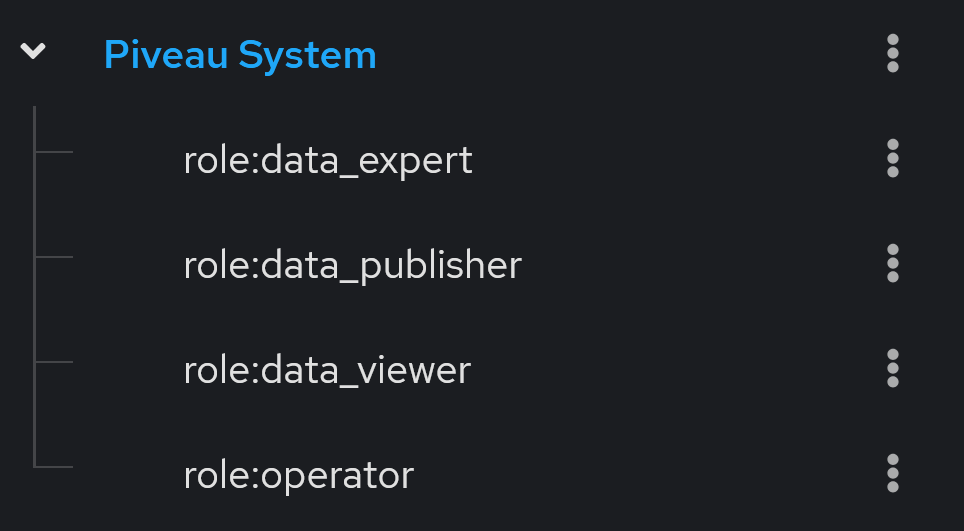
On first startup, the group structure representing the piveau-system roles is created in Keycloak.
Create catalogues and super catalogues#
The catalogue → super catalogue relationship is defined in the payload of the catalogue using the dct:isPartOf and dct:hasPart properties. For access control, the dct:isPartOf property is currently important. A top-level catalogue "super-catalog1" is created without the dct:isPartOf property. After creating the top-level catalogue, the sub-catalogue can be created by using the following part of the payload:
If required, the dct:hasPart property of super catalogues should also be maintained consistently as piveau hub-repo does not automatically reflect the relations through updates of the super-catalog once a new member has declared it's membership.
Maintain datasets and resources in hub-repo#
Datasets and resources are created by calling the corresponding endpoints on hub-repo.
The following use cases are considered here:
- Create, update, delete datasets/resources (including access level and publication status)
- Publish / unpublish → change publication status only
- Change access level only
Datasets and drafts are manipulated using the same API.
All POST / PUT dataset/resource endpoints have the following new optional query parameters:
publicationStatuswith valuesdraft,publishedaccessLevelwith valuespublic,restricted,internal- If new parameters are not used:
- On creation: default values are applied
- On update: current values remain unchanged
Use Case 1.#
The create and update endpoints can be used. These endpoints update the payload, publication status, and access level. See examples below:
PUT http://localhost:8080/catalogues/catalog1/datasets/origin?originalId=dataset2&publicationStatus=published&accessLevel=private
PUT http://localhost:8080/resources/project?id=resource4&catalogId=catalog2&publicationStatus=draft&accessLevel=internal
Use Case 2.#
To publish or unpublish a dataset or resource, you can use one of the following methods:
- Update the dataset or resource using the corresponding update endpoint with the same payload but a changed publication status.
- Use dedicated actions on the Action API.
setDatasetPublicationStatus
{
    "jsonrpc": "2.0",
    "method": "setDatasetPublicationStatus",
    "params": {
        "id": "dataset2",
        "catalogueId": "catalog1",
        "publicationStatus": "draft"
    },
    "id": "3"
}
setResourcePublicationStatus
{
    "jsonrpc": "2.0",
    "method": "setResourcePublicationStatus",
    "params": {
        "id": "resource4",
        "type": "project",
        "catalogueId": "catalog1",
        "publicationStatus": "published"
    },
    "id": "3"
}
Use Case 3.#
To change the access level only, you can use one of the following methods:
- Update the dataset or resource using the corresponding update endpoint with the same payload but a changed access level parameter.
- Use dedicated actions on the Action API.
setDatasetAccessLevel
{
    "jsonrpc": "2.0",
    "method": "setDatasetAccessLevel",
    "params": {
        "id": "dataset2",
        "catalogueId": "catalog1",
        "accessLevel": "restricted"
    },
    "id": "3"
}
setResourceAccessLevel
{
    "jsonrpc": "2.0",
    "method": "setResourceAccessLevel",
    "params": {
        "id": "resource4",
        "type": "project",
        "catalogueId": "catalog1",
        "accessLevel": "internal"
    },
    "id": "3"
}
Create users/service accounts and assign roles#
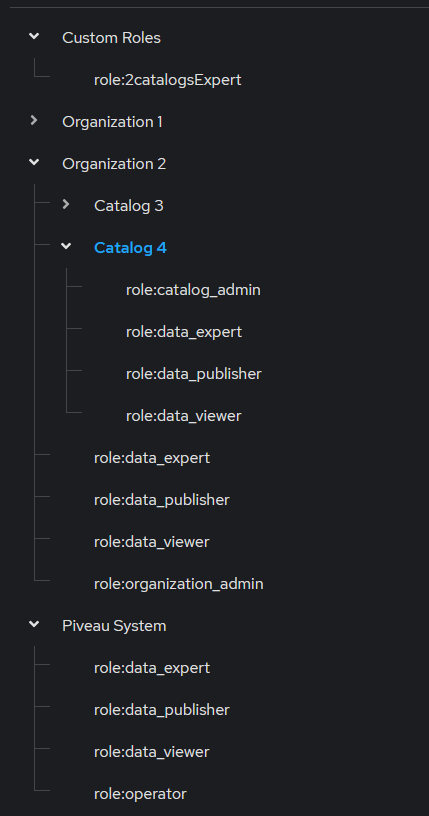
The creation of users/service accounts and the assignment of appropriate roles is managed in Keycloak. Entities such as super catalogues, catalogues, datasets, and resources are represented in Keycloak as groups and sub-groups. Each group representing the entity contains several sub-groups that represent the roles in the context of the specific entity.
Assigning roles to users is achieved by adding users to the sub-groups that represent the desired role.
Note
Assigning a user to the group or sub-group that represents the entity itself has no effect.
The user must be assigned to a sub-group representing a role within the context of the entity.
Create user account#
Keycloak provides extensive capabilities for managing users through its UI. In this simplified scenario, we will examine several different user types and describe how such users can be created and maintained. This represents only a small subset of the available capabilities.
Note
A realm in Keycloak represents an application or portal (e.g. piveau)
We will consider the following user types, which can be useful within the context of piveau access control:
- Master Admin: Represents an administrator who can manage all Keycloak realms. This user is created during installation or manually in the master realm.
- Realm Admin: Represents an administrator who can manage all aspects of a specific realm.
- Restricted Realm Admin: Represents an administrator who can manage only specific aspects of a realm.
- User: A regular user managed in Keycloak. This user can manage their own data.
Creation of a new Master Admin:
- A master admin creates a new user in the master realm and assigns the realm role
admin.
Creation of a new Realm Admin:
- A master admin creates a new user in the target realm (e.g., piveau) and assigns the following client roles:
realm-management realm-admin
Creation of a new Restricted Realm Admin:
- A master admin or realm admin creates a new user in the target realm (e.g., piveau) and assigns the appropriate client roles. The assigned roles depend on the specific administrative permissions required.
For example, if the restricted realm admin should only manage users and groups, the following roles must be assigned:realm-management manage-usersrealm-management query-usersrealm-management view-usersrealm-management query-groups
Creation of a regular user:
The following steps are required to create a regular user:
- Create a new user in the target realm.
- Log in as an admin using either the master console or the piveau realm console.
- Navigate to Users → Add user.
- Fill out the form and, if needed, set the required user actions. The
Update Passwordaction does not need to be explicitly set, as a temporary password will be used and this action will be implicitly triggered. Confirm the creation of the user. - Set a temporary password so the user is forced to change it upon first login: User → username → Credentials → Set password
Different user types can access Keycloak using different access points:
- Master Admin Console (for master admins):
http://localhost:9080/admin/master/console/ - Realm Admin Console (for realm and restricted realm admins):
http://localhost:9080/admin/piveau/console/ - Account Console (for regular users):
http://localhost:9080/realms/piveau/account/
For more information, please refer to the following Keycloak documentation.
Create service account#
In Keycloak, each client automatically has an associated service account. This account behaves like a regular user and can be managed accordingly. To access and manage the service account for a specific client, navigate through the following path:
Clients -> client_name -> Service account roles -> service-account-client_name
The service can obtain an service access token using the Client Credentials Grant flow. This is typically used for server-to-server communication where no user interaction is required and the client credentials are used.
Example group structure in Keycloak#
Assign user to a role#
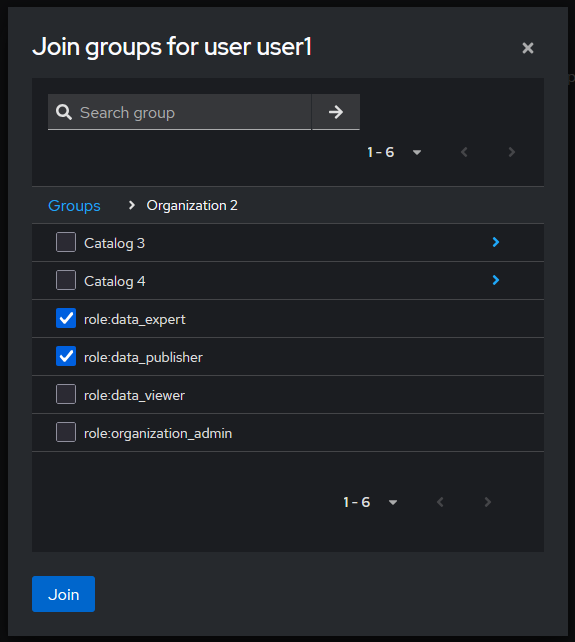
Users and service accounts can be assigned to piveau roles (Keycloak groups) by the following two methods:
- Users -> username -> groups -> join group -> select sub-group representing the role
- Groups -> role group -> members -> add member -> select user
Example for method 1.
Using hub-search#
The hub-search service provides fast access and search functionality for the frontend and other clients. It implements the same decision logic as hub-repo to ensure consistent permission handling in the context of piveau access control.
Reading datasets and resources, as well as searching for them, respects the permissions of the requesting user. Both the /search endpoint and the detail endpoints (/datasets/{datasetId}, /resources/{resourceType}/{resourceId}) only return datasets and resources that match the user's permissions. The access token is passed via the Authorization header. This is typically done using the Bearer token scheme:
Authorization: Bearer <access_token>. If no access token is passed via the Authorization header, the user is considered an anonymous user.
Secured search endpoint#
If access control is enabled, then the /search endpoint is always evaluated against the decision logic described earlier. In other words, /search enforces access control by default.
Examples (without accessControlPermissions)#
-
RESOURCES: Returns all
projectresources the caller has permissions to view based on the permissions encoded inYOUR_JWT_TOKEN: -
DATASETS: Returns all datasets matching the query that the caller has permissions to view based on the permissions encoded in
YOUR_JWT_TOKEN:
/search with accessControlPermissions property#
Additionally, hub-search allows users to search specifically for datasets and resources for which they hold particular permissions. A user can, for instance, search not only for datasets the user is permitted to view, but also for datasets the user is permitted to edit or publish. In order to do so, the accessControlPermissions query parameter is used.
The accessControlPermissions query parameter allows users to specify the following values: view, edit, publish, and delete. This returns only datasets and resources the user has view, edit, publish or unpublish, or delete access to. Note that setting accessControlPermissions to view is equivalent to not specifying any accessControlPermissions query parameter.
Semantics of the accessControlPermissions values#
view- View Permissions: all datasets with public and published properties, plus all published datasets withdataset:view_published, plus all drafts withdataset:view_draft.edit- Edit Permissions: 1, plus a filter for datasets with permissiondataset:updatefor all drafts anddataset:updateanddataset:publishfor all published datasets.publish- Publish or unpublish Permissions: 1, plus a filter for datasets with permissiondataset:publish.delete- Delete Permissions: 1, plus a filter for datasets with permissiondataset:deletefor all drafts anddataset:deleteanddataset:publishfor all published datasets.
Examples (with accessControlPermissions)#
-
VIEW: Search for project resources you have view access to with your
YOUR_JWT_TOKENKeycloak token: -
EDIT: Search for project resources you have edit access to with your
YOUR_JWT_TOKENKeycloak token: -
MULTIPLE: Search for project resources you have view or edit or delete permissions for with your
YOUR_JWT_TOKENKeycloak token. Specifying multiple access control permissions returns resources with at least one of the access control permissions. This is equivalent to having view or edit or delete permissions for a resource. It is not equivalent to having view and edit and delete permissions for a resource:
Secured dataset and resource endpoints#
In addition to /search, hub-search also protects its read endpoints for individual datasets and resources:
GET /datasets/{datasetId}GET /resources/{resourceType}/{resourceId}
These endpoints are always evaluated against the decision logic described earlier. This ensures that hub-search never exposes a dataset or resource at its detail endpoints that the user would not also be allowed to see in search results.
- GET a dataset by ID
Returns the dataset dataset123 from catalogue catalog1 if YOUR_JWT_TOKEN grants view permissions:
curl \
  -X GET "http://localhost:8084/datasets/dataset123?catalogId=catalog1" \
  -H "Authorization: Bearer YOUR_JWT_TOKEN"
- GET a resource by type and ID
Returns the project resource with ID project1 in catalog1 if YOUR_JWT_TOKEN grants view permissions:
curl \
  -X GET "http://localhost:8084/resources/project/project1?catalogId=catalog1" \
  -H "Authorization: Bearer YOUR_JWT_TOKEN"
Create custom roles#
Keycloak allows the creation of custom roles, which can be tailored to specific access control requirements. Custom roles are manually created by a Keycloak administrator. This involves:
- Creating new groups to represent the roles.
- Associating these groups with relevant resources and scopes using group based polcies and permissions
This approach enables fine-grained control over permissions and access levels within the system. Please see the corresponding Keycloak documentation.
User management#
Currently, user management in piveau is performed through the Keycloak UI. If the project context requires that regular users should be able to handle parts of the user management themselves, two main approaches can be considered:
- Development of a custom user management UI
- Granting restricted admin access to the Keycloak UI for specific users
Keycloak offers several customization options that can support such requirements:
- Custom look and feel to ensure seamless integration with the rest of the application
- Multiple access points to Keycloak:
- Master Admin Console
- Realm Admin Console
- User Account Console
- Granular access control for users via:
- Access limited to a single realm
- Access restricted to groups and users only
- Access to specific top-level groups (e.g. representing an organization)
These capabilities can be implemented using realm management roles and Fine-Grained Admin Permissions (FGAP) V2. The corresponding documentation can be found here:
- Achieving Fine-Grained Admin Permissions with Keycloak 26.2
- Delegating realm administration using permissions
The group structure in Keycloak, which represents backend entities such as catalogues and datasets, is subject to change over time. To support the definition of restrictions on such evolving structure, it would be beneficial to automate certain issues via the hub-repo.
Note
This is currently considered future work.
Maintain group structure in Keycloak#
Piveau provides a hub-repo shell command (syncKeycloak) that can be used to maintain the group structure in Keycloak.
Note
If a subgroup representing a role is removed and then added to Keycloak again, all user assignments are deleted.
Note
When the command creates datasets and custom resources for specific or all catalogues, it follows the configured strategy.
The usage is illustrated with examples:
syncKeycloak -cmd create→ Creates all super and sub-catalogues without datasets and custom resources.syncKeycloak -cmd create -i→ Creates all super and sub-catalogues including datasets and custom resources (according to the configured strategy).syncKeycloak -cmd create -cid catalog1 catalog2 -i→ Createscatalog1andcatalog2(and their super-catalogues if required), including datasets and custom resources (according to the configured strategy).syncKeycloak -cmd delete -i→ Deletes all catalogues and datasets in Keycloak that are stored inhub-repo.syncKeycloak -cmd delete -cid catalog1 catalog2→ Deletescatalog1,catalog2, all sub-catalogues, and all resources and datasets of the removed catalogues.syncKeycloak -cmd create -cid catalog1 -rid test-dataset-001 test-dataset-002→ Createstest-dataset-001andtest-dataset-002incatalog1ifcatalog1already exists. The element is created independent of the configured strategy.syncKeycloak -cmd delete -cid catalog1 -rid test-dataset-001 test-dataset-002→ Removestest-dataset-001andtest-dataset-002incatalog1
Customizability scenarios#
It is expected that future developments will introduce new requirements for access control in piveau. Below is a list of potential extension scenarios:
- New access control concepts
- New or modified project specific roles based on existing technical scopes
- New technical scopes, new semantics of existing scopes
- New properties of entities or new values for existing properties
- Adapted decision logic, new data the logic relies on
- Usage of further authorization systems such as Open Policy Agent, etc.
- Ui for user management
- New dataset/resource creation strategy in Keycloak
Summary, Key Points and Required Steps#
This section provides a summary of the key considerations and steps when using Access Control V2. It also outlines limitations that should be taken into account during planning.
Before using Access Control, it is important to determine which rights and permissions need to be defined. Consider how users and permissions should be managed within the specific project. Next, evaluate whether the out-of-the-box features meet these requirements, or if adjustments, such as changes in Keycloak are necessary.
The next step is to configure roles within the respective contexts (in hub-repo). These structures are then mapped to Keycloak. Note that if an entity is already represented in Keycloak and the role configuration is changed later, these changes will only affect newly created entities, not those that already exist.
It is also necessary to consider whether manual permission assignment at the dataset/custom resource level is required for the specific project. If so, an appropriate strategy must be configured for representing datasets in Keycloak. For example, there is no benefit in synchronizing public datasets in harvested catalogues with Keycloak, as there will never be a need to assign permissions to a user for these datasets. Such catalogues should be excluded in the configuration.
Finally, assess whether the use of custom roles or other mechanisms for user selection is necessary. If required, the Keycloak setup must be extended accordingly.
Limitations and Scope of This Approach#
- Permissions are assigned by an administrator. A role must be explicitly assigned by adding the user to a group. Currently, there is no out-of-the-box mechanism for defining rules that select users based e.g. on their attributes.
- There is no automation to automatically assign the creator as a user with permissions when a dataset is created.
- There are no roles/permissions that reference the owner or creator of a dataset.
- It is possible to create custom roles. In this case, a role-group is created, and the administrator decides which resources and scopes are assigned to the user (creation and maintenance of permissions and policies by the administrator).
- It is also possible to create custom policies that capture a set of users without explicitly assigning each user to a group (advanced topic)
- It is therefore essential to carefully consider the requirements for Access Control at the beginning of a project.